All Posts By Antonio RussoJuly 16, 2026 · 12 min read
Agent Blueprints in Entra: Your Governance Layer Is Also Your Attack Surface
By Antonio RussoJuly 16, 2026 · 12 min read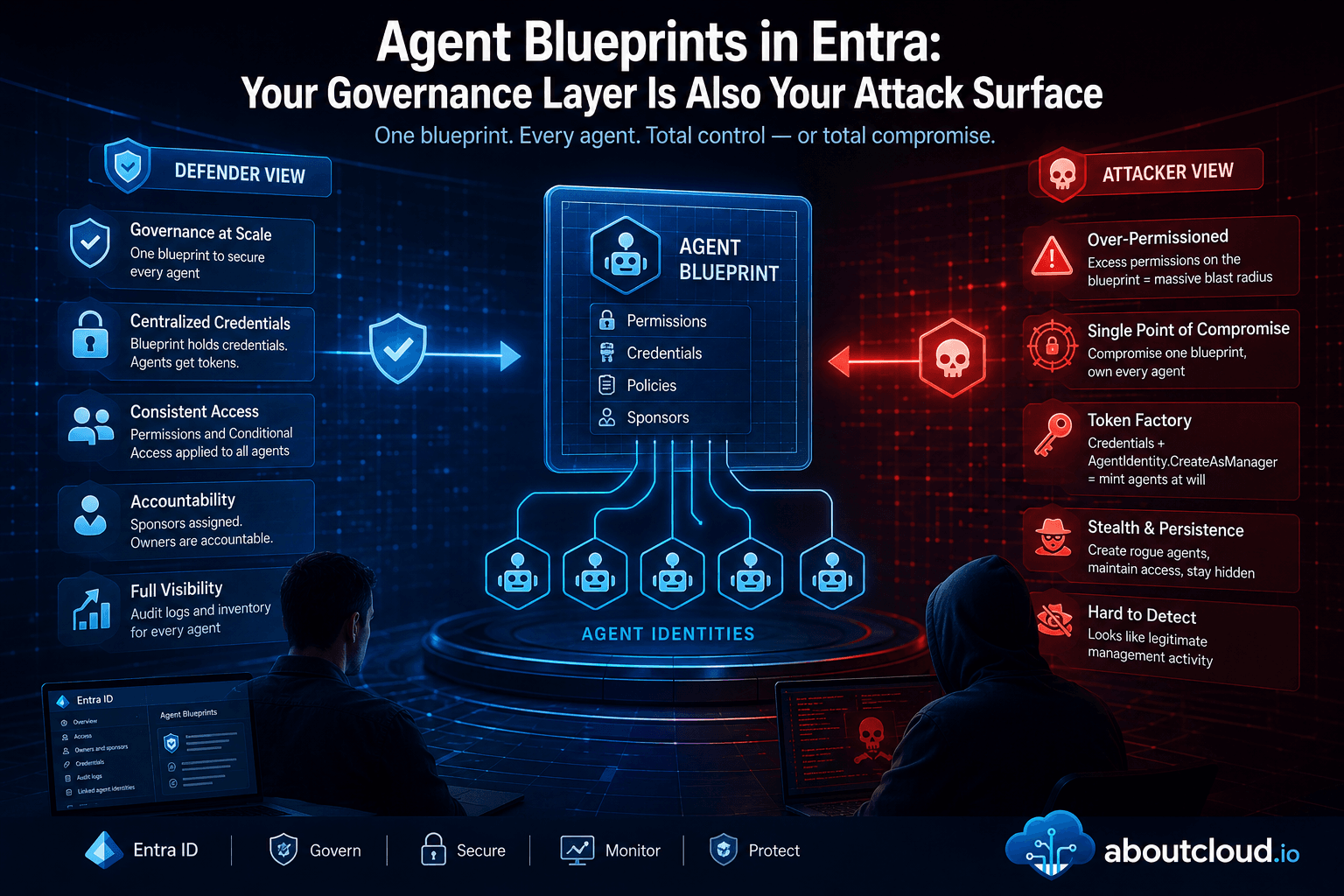
Preview note. Microsoft Entra Agent ID and agent blueprints are evolving quickly. The admin center navigation, the manifest editor, and the classic-vs-modern agent distinction were all in preview when this was written. Screenshots are timestamped; treat the UI as a moving target and verify against current Microsoft Learn docs before acting on anything here.
AI agents are already in your tenant. Not as a roadmap item. Right now. A sales manager wires up a Copilot Studio agent that reads SharePoint and sends follow-ups. An HR lead builds one that processes leave requests through Power Automate. A developer spins something up in Foundry that queries Defender data. Each of those is now a first-class identity in Entra, and behind each one sits an object most admins haven't looked at yet: the agent identity blueprint.

The blueprint is a new kind of high-value principal. This post does two things with it. First, the primer ,what a blueprint is and what Microsoft designed it to do. Then the part that's actually interesting: the same object, threat-modeled from both sides. Because the features that make a blueprint good governance are exactly the features that make it a target.
What a blueprint actually is
A blueprint is two objects working together:
- The blueprint application — the configuration. Credentials, granted OAuth permissions, identifier URIs, scopes.
- The blueprint principal — the service principal that makes the blueprint visible and usable inside your tenant.
If you've worked with app registrations, you already know this shape: it's the same relationship as an App Registration (the config) and its Enterprise Application (the principal in your directory). The blueprint application defines what an agent is; the blueprint principal is how that definition shows up and does work in your tenant.
Every agent identity in the tenant is a child spawned from a blueprint. And two facts about that parent-child relationship carry the entire rest of this post:
- Agent identities inherit the blueprint's granted OAuth permissions. Permissions are granted at the blueprint, and every agent created from it gets them.
- Agent identities have no credentials of their own. The blueprint holds the credentials and mints tokens on each agent's behalf.
Hold onto those two. They are the good news and the bad news, depending on who's reading

Classic vs modern agents
One distinction worth thirty seconds. Classic agents are AI agents created as ordinary service principals or app registrations ,for example, Copilot Studio agents built before Entra Agent ID existed. They show up in the registry with no Agent ID, and critically, they can't be protected by Conditional Access for Agents or Identity Protection for Agents. Modern agents are created through the Agent ID platform, each backed by a blueprint, with a real Agent ID, a full audit trail, and the complete governance capability set. Microsoft has said a migration tool is planned. Until it lands, audit your tenant now so you know which agents fall into which bucket , the classic ones are the blind spots.
The intended-good story: blueprints as governance
Microsoft designed the blueprint around three jobs, and each one is genuinely useful.
Template. Deploy many instances of an agent ,different goals, different access levels , from one blueprint with a consistent configuration. Define it once, apply it fleet-wide. If you've used Intune security baselines, the pattern clicks immediately: one baseline, enforced across every device; one blueprint, enforced across every agent.
Credential container. Agents don't carry their own secrets. The blueprint holds the credential and acquires tokens on the agent's behalf. Fewer places for a secret to leak, one place to rotate.
Management container. Conditional Access policies and permissions apply at the blueprint and take effect for every child. Disabling a blueprint prevents all of its agent identities from authenticating , a single, clean kill switch for a whole fleet. And every blueprint requires a sponsor: the human or group accountable for the agent, and the person you call when something goes wrong.
 Accountability Model: Ownership
 Accountability Model: Permissions
So far, so defensible. Now flip it over . . . . . . . .
The same object, from the other side
Nothing below is a how-to for abuse. It's a threat model: what an attacker does with a blueprint, why the mechanics allow it, and , in the next section , what it looks like when they do. The point is that a defender who hasn't thought about the blueprint this way will miss it.
Permission inheritance is a blast radius
Every permission granted to a blueprint is inherited by every agent identity spawned from it. Defensively, that's fleet-wide policy. Offensively, it's a single object whose consent grant fans out to N agents. Over-consent one blueprint , or compromise one , and the excess reach lands on every child at once. The blueprint is the smallest object with the largest permission footprint in the agent world. That screenshot of the Admin consent tab you just took? That's the blast radius, drawn to scale.

The blueprint is a token factory
Two mechanics combine here. The blueprint holds the credentials , secrets, certificates, or federated credentials. And it carries a special Microsoft Graph permission, AgentIdentity.CreateAsManager, that lets it provision agent identities in the tenant. Put those together and a blueprint you control is a factory: it mints new identities and mints tokens for them. An attacker who gains control of a blueprint doesn't need to compromise agents one by one ,they own the thing that manufactures agents.

Federated credentials are the modern backdoor
Adding a federated identity credential (FIC) to a blueprint is the agent-era version of a persistence trick red teams already know from app registrations. No stored secret to find. Trust anchored to an external OpenID Connect provider , potentially one the attacker controls. It's quiet, it survives secret rotation because there's no secret, and if you're only watching for new client secrets you won't see it. This is the single most important thing to monitor on a blueprint.


Multitenant blueprints are a supply-chain surface
Blueprints can be published as multitenant and added to other tenants via Microsoft catalogs. When one is added to a tenant, a local blueprint principal is created there. That's a legitimate distribution model , and also a supply-chain path. A blueprint added to your tenant drops a principal into your directory that can create local agent identities. Review what multitenant blueprints exist in your tenant and who published them, the same way you'd review third-party enterprise apps.


Detection: the part that requires attention
Here's the uncomfortable bit, straight from Microsoft's own documentation: audit logs don't distinguish agent identities from other identity types by default.
- Operations on agent identities, blueprints, and blueprint principals are logged under the
ApplicationManagementcategory. - Operations initiated by agent identities appear as service principals , indistinguishable, at a glance, from any other app.
- Microsoft Graph activity logs bucket requests from agent identities as applications, with the agent surfaced in the
appIDcolumn.
Translation: out of the box, blueprint and agent activity hides inside the noise of ordinary application and service-principal telemetry. Detection isn't a matter of filtering to an "agent" event type , that event type doesn't exist yet. It means correlating object IDs from the logs back to Microsoft Graph to resolve what kind of entity actually acted.
 This visually proves the blind spot: the event is there, but nothing about it announces "agent".
The hunting priorities, given that blind spot:
- New credential added to a blueprint ,especially a federated credential. This is your highest-signal detection. A new FIC on a blueprint that didn't have one is either a legitimate deployment change you can account for, or a backdoor.
- Anomalous blueprint creation : a new blueprint outside your known provisioning process or created by an unexpected principal.
- Unexpected use of
AgentIdentity.CreateAsManager— the token factory running when it shouldn't be. - Consent grants at blueprint scope : new OAuth permissions landing on a blueprint, since that grant inherits to every child.
What's verified (from Microsoft Learn):
- The
agentTypeproperty and its exact enum values (agenticApp,agenticAppInstance,agentIdentityBlueprintPrincipal,agentIDuser,notAgentic) documented. - The audit-activity mapping: blueprint creation → "Add application" with
agentType=agenticApp; agent creation → "Add service principal" withagenticAppInstance— documented in the mapping table. blueprintIdas the correlation key back to the parent blueprint — documented.- The Graph
$filterfor agent sign-ins — copied verbatim from the doc. - Standard table/column names (
AuditLogs,OperationName,TargetResources,InitiatedBy) — long-established.
The one caveat: whether agentType and blueprintId surface as queryable fields in the Sentinel/Log Analytics AuditLogs table (versus only in the Graph API auditLogs response) isn't something Microsoft's doc states explicitly. The schema is documented at the Graph level; the Log Analytics projection may lag or nest these under AdditionalDetails.
Hunting queries
These fields are documented at the Microsoft Graph level. Whether agentType and blueprintId project cleanly into the Sentinel/Log Analytics AuditLogs table , versus arriving nested inside AdditionalDetails or TargetResources can lag the Graph schema during preview. Run AuditLogs | where TimeGenerated > ago(7d) | take 20 against your own workspace and inspect the actual shape before trusting any of these in production.
First, the correlation key. Microsoft designed one property to tie every agent action back to its parent: blueprintId, the object ID of the blueprint. And the actor's nature is carried in agentType, whose value is anything other than notAgentic when an agent is involved. Those two properties are the whole detection strategy , everything else is filtering.
1. New credential added to a blueprint (highest-signal detection)
Because blueprint activity is logged as application events, a credential added to a blueprint surfaces as a certificate/secret operation on an application whose agentType is agenticApp. This is your FIC-and-secret backdoor detection.
kql
AuditLogs
| where OperationName has_any ("Add application", "Update application", "Certificates and secrets management")
// agentType may arrive at the top level, inside TargetResources, or under AdditionalDetails depending on your workspace projection — verify and keep the branch that matches
| extend TargetAgentType = tostring(TargetResources[0].agentType)
| extend BlueprintId = tostring(TargetResources[0].blueprintId)
| where TargetAgentType == "agenticApp" or isnotempty(BlueprintId)
| extend Actor = iff(isnotempty(tostring(parse_json(tostring(InitiatedBy.user)).userPrincipalName)),
                     tostring(parse_json(tostring(InitiatedBy.user)).userPrincipalName),
                     tostring(parse_json(tostring(InitiatedBy.app)).displayName))
| project TimeGenerated, OperationName, Actor, BlueprintId, TargetAgentType, Result, CorrelationId
| sort by TimeGenerated desc
Maps to MITRE T1098.001 — Account Manipulation: Additional Cloud Credentials. A federated credential is the higher-priority variant because it leaves no secret to rotate away.
2. Anomalous blueprint creation
A new blueprint is an "Add application" event with agentType = agenticApp. Baseline who normally provisions blueprints and alert on anyone outside that set.
kql
AuditLogs
| where OperationName == "Add application"
| extend TargetAgentType = tostring(TargetResources[0].agentType)
| where TargetAgentType == "agenticApp"
| extend Actor = tostring(parse_json(tostring(InitiatedBy.user)).userPrincipalName)
| extend ActorIP = tostring(parse_json(tostring(InitiatedBy.user)).ipAddress)
| project TimeGenerated, Actor, ActorIP, TargetResourceName = tostring(TargetResources[0].displayName), Result, CorrelationId
| sort by TimeGenerated desc
3. Agent identities created from a blueprint . Watch the fan-out
Every child agent is an "Add service principal" event with agentType = agenticAppInstance, carrying the blueprintId of its parent. Summarizing by blueprintId shows you which blueprint is spawning agents and how fast , a sudden burst from one blueprint is worth a look.
kql
AuditLogs
| where OperationName == "Add service principal"
| extend AgentType = tostring(TargetResources[0].agentType)
| extend BlueprintId = tostring(TargetResources[0].blueprintId)
| where AgentType == "agenticAppInstance"
| summarize AgentsCreated = count(), FirstSeen = min(TimeGenerated), LastSeen = max(TimeGenerated) by BlueprintId
| sort by AgentsCreated desc
4. Resolving the blind spot with Microsoft Graph
The reason detection is hard: in the raw logs, agent actions wear the clothes of ordinary applications and service principals. The clean way to separate them is the documented sign-in filter, which pins the event type to a service principal and the actor to an agent identity:
GET https://graph.microsoft.com/beta/auditLogs/signIns?$filter=signInEventTypes/any(t: t eq 'servicePrincipal') and agent/agentType eq 'AgentIdentity'And when you're reading blueprint-principal or agent-user events back through Graph, add the header below , those enum values are part of an evolvable enumeration and won't be returned without it:
Prefer: include-unknown-enum-membersThat header requirement is a genuine footgun: omit it and your tooling silently drops the very blueprint-principal events you're hunting for.
Hardening checklist
- Least privilege at blueprint scope. Assume every grant fans out to every child. Grant accordingly.
- Prefer FIC over secrets for legitimate credentials — but monitor FIC additions closely, because the same mechanism is the backdoor.
- Alert on any new credential on a blueprint, treating federated credentials as the top priority.
- Monitor
AgentIdentity.CreateAsManagerusage and reconcile it against known provisioning. - Review multitenant blueprint additions the way you review third-party enterprise apps.
- Assign a real, accountable sponsor to every blueprint , you'll want a human to call during an incident.
- Disable, don't orphan, on decommission. Disabling a blueprint kills auth for its whole fleet cleanly; deleting the blueprint triggers cleanup of its child identities. Don't leave orphaned agents behind.

The takeaway
The blueprint is the App Registration moment for agents. It's the object where credentials live, where permissions are granted, and where identities are manufactured ,which makes it both the best place to enforce governance and the best place to attack. The features are the same; only the intent differs. Get visibility into your blueprints now, while the population is small and the tooling is still catching up, because the log surface isn't going to make it easy for you.
If you're running a similar setup or have questions, reach out in the comments or on LinkedIn.
— Antonio | AboutCloud
arusso@aboutcloud.io
Comments
You might also like
Aug 12, 2026
Entra Tenant Governance hits GA: what it actually solves and where it sits in your 2026 stack
A practical read for engineering and governance teams , the actual API surface, the limits that shape your design, and an honest comparison against Microsoft365DSC | Tenant Configuration Management APIs, Maester, ScubaGear and Azure Policy. If you run identity for an organization of any size, you have two lists. The list of tenants you manage, and the list of tenants that exist. They are not the same list, and the gap between them is where incidents start. On 10 August, Microsoft moved Entra T
By Antonio Russo
May 5, 2026
Meet "Ask AboutCloud" . An AI chatbot for the blog and the ENTRA ID Community , with safety receipts
This is nothing new in the Tech world.....but if you've visited the blog in the last few days, you've probably noticed a small chat bubble in the bottom-right corner. That's Ask AboutCloud Bot, a new feature I've been quietly cooking up: a semantic search engine and RAG (Retrieval Augmented Generation) chatbot that can answer questions about every post on this blog, plus the three free Entra ID tools I maintain. As well anything related to ENTRA ID in general and Internet searches . It runs end
By Antonio Russo