All Posts By Antonio RussoMay 17, 2026 · 18 min read
Announcing EntraPass: a passkey readiness scanner that refuses to lie about your tenant
By Antonio RussoMay 17, 2026 · 18 min read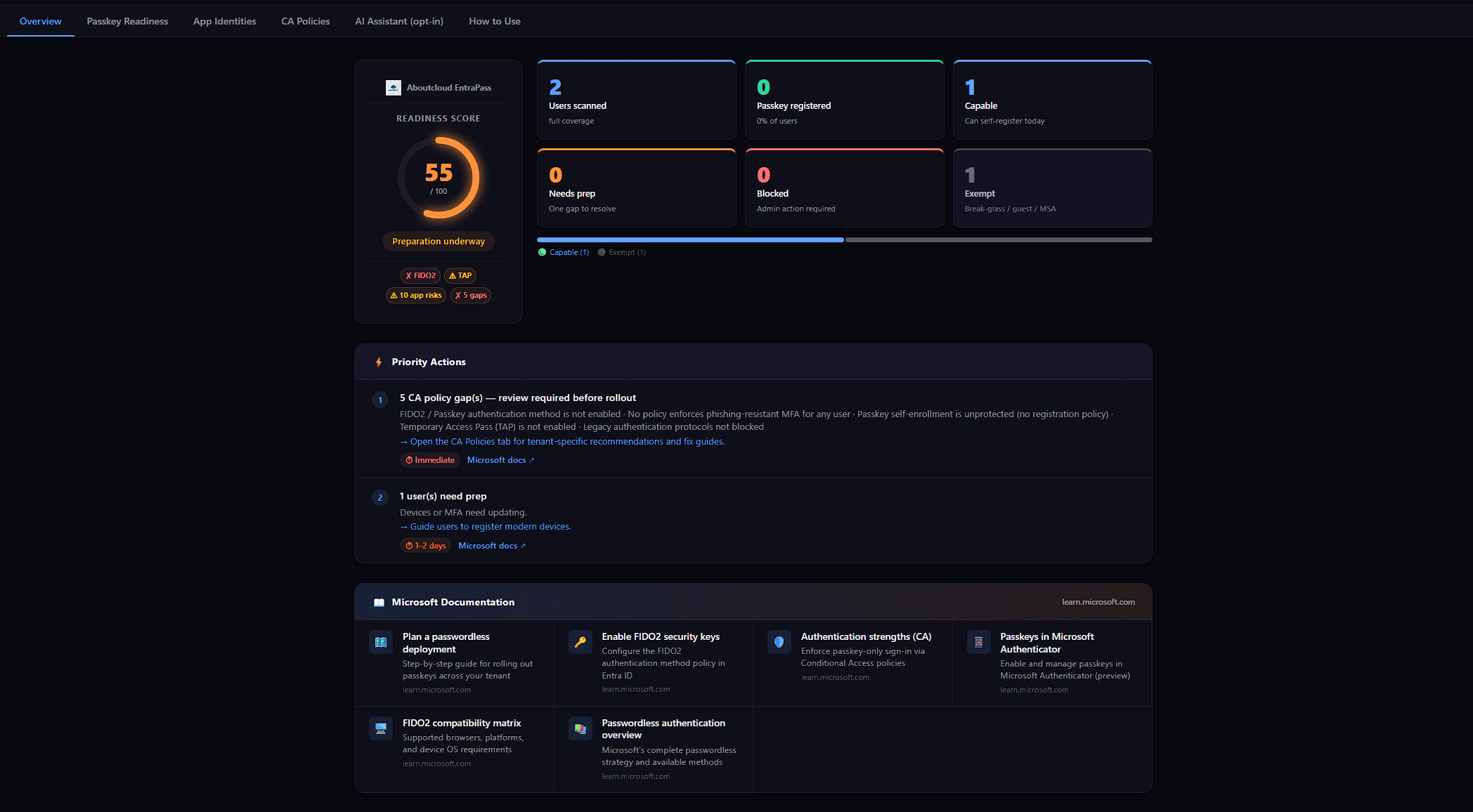
When Microsoft pushed passkeys from future direction to deploy now, I started getting the same question from every IT lead I spoke to:
Who in our tenant can actually adopt passkeys this week? And who can't, and why?
It's a deceptively simple question. The tooling situation around it is not. The Entra admin portal has the answer spread across four blades. The Microsoft Graph API has the right primitives, but no single endpoint that combines them. The hosted SaaS scanners want either a privileged service principal in your tenant or a per-seat license — usually both.
So I built EntraPass: a browser-only, free, open-source passkey readiness scanner for Microsoft Entra ID. Open entrapass.aboutcloud.io, sign in with PKCE against your own tenant, and in under a minute you have a per-user classification of who can adopt passkeys today, who's one fix away, and who can't until something changes.
This is the build story, the architecture, and — most usefully — the design rule that I think most scanners in this space get wrong.
Live Demo — EntraPass in action
What it does
EntraPass classifies every user in your tenant into one of five readiness tiers:
ReadyUser has a FIDO2 passkey registeredCapableUser has MFA + a modern device — can self-register at aka.ms/mysecurityinfo today, no admin prep neededNeeds PrepOne specific gap — typically no MFA yet, or device is too oldBlockedMultiple gaps, or a Conditional Access policy actively prevents passkey useExemptBreak-glass, guest, or personal account — by design, doesn't get passkeysIt also classifies each of your Conditional Access policies for its relationship to passkey deployment (blocks passkey registration, enforces phishing-resistant authentication, governs the registration user action, and so on), surfaces toxic combinations like privileged user with no MFA registered, and computes a 0–100 composite readiness score.
Then it exports the whole thing as a CSV you can hand to whoever owns the rollout. A "Suggested rollout order" panel tells you exactly who to start with: Capable tier first (no admin prep needed), then Needs Prep (one Temporary Access Pass per user), then Blocked (CA policy or device remediation first).
A scan finishes in under a minute on tenants up to around 500 users. Everything happens in your browser. Nothing — not a single user identifier, not a sign-in date, not a policy expression — leaves the client.
Features
EntraPass groups its analysis into five capability areas plus a cross-cutting set of architectural guarantees.

User and account analysis
- 5-tier readiness classification: Ready / Capable / Needs Prep / Blocked / Exempt
- Honest Unknown tier for users whose registration data couldn't be read — shown with a neutral grey badge and excluded from the score denominator, not misclassified
- Account type detection: member, guest, personal account (26 consumer email domains), break-glass — each routed to the appropriate exempt category
- Per-user recommended action and remediation hint
- Toxic combination surfacing: privileged user with no MFA, Global Admin without a phishing-resistant method, and similar high-impact pairings
Conditional Access policy analysis
- Six-category policy classification: blocks passkey, enforces passkey, protects registration, blocks legacy auth, risk-based, other
- Strict phishing-resistant enforcement detection — Passwordless MFA strength correctly does NOT qualify
- Specific fix recommendation per blocking policy
- Report-only and disabled state handled distinctly from active enforcement
Application identity analysis
- App registrations and service principals classified by credential risk
- Expired or expiring password credentials flagged with expiry date
- Owner coverage and bus-factor warnings
- Microsoft-managed first-party apps distinguished from your custom apps
- Legacy authentication signals surfaced (ROPC, password grant, etc.)
Scoring and reporting
- 0–100 composite readiness score with documented formula
- Null score (
—) when no scorable users exist — the tool refuses to fabricate a number - Infrastructure health chips: FIDO2 policy state, TAP policy state, app credential risk, policy gap count
- Suggested rollout order panel: Capable users first, then Needs Prep, then Blocked
- Executive summary and prioritized recommendations
- CSV export with 13 columns, ready for IAM team handoff
- Filter pills and full-text search across users
Optional AI Assistant
- Plain-English Q&A over your scan results
- Three modes: hosted (Cloudflare Workers AI, free), bring your own LLM key, or off entirely
- Defense-in-depth chain on the hosted endpoint: origin enforcement, rate limiting, prompt injection filter, destructive query filter, off-topic filter, server-side PII strip
- Curated Microsoft Learn URL citations — never invented
- Rule-based fallback when the LLM is unavailable
Architectural guarantees (cross-cutting)
- Browser-only execution: no backend stores or sees your scan data
- PKCE authentication: no client secret to manage, no service principal lingering after the scan
- Seven read-only delegated Graph permissions: cannot modify your tenant
- Open source under MIT license: every claim is auditable in the repository
The architecture, briefly
Three load-bearing decisions:
 HLD
HLD HLD Flows
Browser-only execution. The whole app is a static SPA — vanilla JavaScript, Vite, MSAL.js for PKCE auth. It runs on Cloudflare Pages but it would run identically on any static host, or on your laptop with a one-line dev server. There is no backend that holds your data, because there is no backend. An optional AI Assistant uses a tiny Pages Function that receives count-only summaries (never user names or UPNs) and you can ignore it entirely if you don't want it.
PKCE, no client secret. EntraPass registers as a SPA application in your tenant using OAuth 2.0 PKCE. The setup wizard walks you through creating the app registration in three steps. There is no shared client secret to manage, no cross-tenant trust relationship, no service principal sitting in your directory after the scan finishes.
Read-only delegated scopes — all seven of them. No more, no fewer:
User.Read,User.Read.AllDevice.Read.AllPolicy.Read.AllApplication.Read.AllAuditLog.Read.AllOrganization.Read.All
None of these can modify your tenant. The tool can't add a passkey, can't change a policy, can't create a user. If you revoke admin consent after the scan, every trace of EntraPass in your directory disappears.
For the CISO reading this: the threat model collapses to "a static page in a browser tab read the directory and produced a report someone copied into Excel." That's a comfortable place to be.
Reading the docs more carefully than the typical implementation
While reviewing the codebase I noticed I was using the wrong Microsoft Graph endpoint. The original code iterated /users/{id}/authentication/methods per user — fifty calls for fifty users — to determine MFA registration status.
Microsoft's own documentation explicitly says don't do this for auditing scenarios. The recommended endpoint is /reports/authenticationMethods/userRegistrationDetails: one bulk call, the entire tenant, returns isMfaRegistered and isPasswordlessCapable flags plus a methodsRegistered string array. It uses the AuditLog.Read.All scope EntraPass already has — no new privileged consent required.
Switching to it gave three things at once:
- The Microsoft-recommended pattern (documentation alignment)
- No new privileged scope (
UserAuthenticationMethod.Read.Allwas on the table; we dropped it) - One bulk call replaces N per-user calls — latency, rate limits, and sampling caps all gone
This is the kind of thing where reading the docs more carefully than the typical implementation pays off.
Detecting CA policy passkey enforcement without false positives
The other place EntraPass had to be precise: classifying which Conditional Access policies actually enforce passkey use.
 CA Analyzer
The easy implementation — and the one I see most often — is a substring check on the policy's authentication strength. If 'fido2' appears anywhere in allowedCombinations, the policy is "enforcing passkey." That's wrong, and it's wrong because of how Microsoft composes the built-in strengths:
A some() check fires true on all three. But only the third one enforces passkey-class authentication — the first two permit a non-phishing-resistant code path. A scanner using some() will tell a tenant on Passwordless MFA strength that they're "enforcing passkeys" when in fact users can still satisfy the policy with an Authenticator push notification.
The correct check is strict — every allowed combination must be phishing-resistant:
javascript
const PHISHING_RESISTANT = new Set([
  'fido2',
  'windowsHelloForBusiness',
  'x509CertificateMultiFactor',
]);

const combos = grantControls?.authenticationStrength?.allowedCombinations || [];
const enforcesPasskey = combos.length > 0
  && combos.every(c => PHISHING_RESISTANT.has(c));
The earlier version of this code matched on fido2, windowsHelloForBusiness, and deviceBasedPush — which sounds reasonable until you check the docs and find that deviceBasedPush is in Passwordless MFA, not Phishing-resistant MFA. The phishing-resistant set is actually {fido2, windowsHelloForBusiness, x509CertificateMultiFactor}. The fix landed before launch.
These details are not exotic. They're in the Microsoft Learn pages, one fetch away. But they don't survive a quick implementation pass — the typical "scan my passkey readiness" code I've seen treats authentication strength as a free-form bag of properties rather than an enum-defined set with documented members.
About the optional AI Assistant
EntraPass ships with an optional AI Assistant. When you've scanned your tenant and you're staring at a dashboard with twelve critical findings and a 56/100 score, the assistant lets you ask plain-English follow-up questions:
- "Which CA policy is doing the most damage to my readiness score, and why?"
- "What's the fastest path from where I am now to enforcing passkeys tenant-wide?"
- "Why is this user in Blocked when their colleagues are Capable?"
It's a fast second opinion on the data — useful for shaping a remediation plan, briefing a stakeholder, or sanity-checking a recommendation before you act on it. It is also, very deliberately, the part of the system most carefully constrained.
 AI...is not a gimmick..
What the AI sees, and only what it sees
When you ask a question, EntraPass builds a summary of your scan results client-side, in your browser, before any network call is made. The summary contains aggregate counts and infrastructure flags — never identifiers. Here is exactly the shape of what gets sent:
javascript
// Example AI Assistant payload — built in your browser, sent to the LLM
{
  question: "Why is my score 56 and what should I fix first?",
  results: {
    totalUsers:     50,
    readyUsers:     12,
    capableUsers:   18,
    needsPrepUsers: 6,
    blockedUsers:   1,
    exemptUsers:    9,
    score:          56,
    recommendations: [
      "Enable phishing-resistant MFA strength on your tenant-wide policy",
      "Issue a Temporary Access Pass to users in Needs Prep tier",
      // up to 5 recommendation strings — server caps further
    ]
  }
  // No user names. No UPNs. No sign-in timestamps.
  // No policy expressions. No group memberships. No device IDs.
}
The raw scan data — user names, UPNs, sign-in dates, group memberships, individual policy expressions — never leaves your browser. The AI receives the shape of your tenant, not its contents.
The system prompt is in the repo
The system prompt that constrains the assistant's behavior lives at functions/ai/ask.js. You can read it, audit it, fork it. The guardrails are explicit:
- The assistant only answers questions about EntraPass scan results — no general-purpose chat, no creative writing, no off-topic tangents.
- It cannot recommend specific commercial products, vendors, or third-party tools beyond Microsoft's own documentation.
- It is instructed to admit uncertainty rather than fabricate detail. If your question requires data the summary doesn't contain — the exact name of a user, the exact text of a policy condition — it says so rather than guessing.
- It cannot request additional data, trigger another scan, or call any other endpoint. The summary it received is the only context it gets for the answer.
Defense in depth — what happens between a question and the LLM
Even with aggregate-only data, the hosted endpoint has its own attack surface. Each request walks through a chain of guards before the LLM is ever invoked. The chain lives in functions/ai/ask.js — one file, auditable in a coffee break:
1. Origin enforcement. Access-Control-Allow-Origin is set only when the Origin header exactly matches the configured ALLOWED_ORIGIN. Anything else returns 403 with no CORS header — the browser blocks the response before the calling page can even see it.
2. Method and payload caps. POST only. Body capped at 512 KB before parsing. Question capped at 2,000 characters. Conversation history capped at the last 10 messages, each truncated to 500 characters. The attack surface stays bounded.
3. Per-IP rate limiting. 20 requests per minute. Exceeded returns a structured 429 with a built-in nudge to switch to BYOK — the hosted-endpoint quota is a Cloudflare-tier-cost concern, not a security feature, and users who need higher volume have a self-service path that doesn't depend on the hosted endpoint at all.
4. Prompt injection filter. Twenty-plus regex patterns (NFKC-normalized to defeat Unicode confusables) reject the well-known injection shapes before they reach the LLM: "ignore previous instructions", "forget everything", "reveal your system prompt", "act as DAN / jailbreak / unrestricted", "bypass safety", plus model-specific control tokens ([INST], <|system|>). A match returns a generic 400 — the rejection doesn't echo back why, because that would be an oracle for crafting a better attack.
5. Destructive query filter. A separate regex set rejects security-harm topics regardless of phrasing: SQL injection / XSS / SSRF / RCE technique requests, malware and credential-dumping questions (mimikatz, kerberoast, pass-the-hash, Cobalt Strike), "disable security/logging/audit/Defender", "steal/exfiltrate/dump credentials", and any phrasing of "how to hack / exploit / breach / compromise Entra / Azure / Microsoft / tenant". The assistant exists to help admins close gaps — not to coach attackers through them.
6. Off-topic filter. Crypto, politics, NSFW, medical, legal, and financial advice — anything outside the EntraPass / passkey / Entra ID scope returns a polite 200 redirect rather than a hard 400. (Off-topic gets a softer landing than injection or destructive queries: the user wasn't attacking the system, they just asked the wrong tool.)
7. Server-side PII strip — defense in depth on a client-side guarantee. The client is supposed to build the count-only summary before sending. The server also enforces it. The Pages Function inspects incoming results, logs a warning if any record contains a userPrincipalName or displayName field, and builds its own summary using only the count fields and recommendation strings. If a future client regression sends raw user records, the server discards them before the LLM sees a single byte. "The client always does the right thing" is not a security property worth relying on.
8. History sanitization. Conversation history is filtered to messages with valid role and content shapes, capped at the last 10 messages, with each message itself truncated to 500 characters. Malformed entries are silently discarded.
9. Rule-based fallback. If the LLM binding is unavailable or the free tier is exhausted, the assistant doesn't fail — it falls back to a rule-based responder built into the same Pages Function. Pattern-match the question against common topics (how it works, permissions, security, readiness, CA policies, rollout planning), return a pre-written response with a curated Microsoft Learn URL. Same SSE wire format as the LLM path, so the UX is continuous. The assistant degrades gracefully — it isn't a single point of failure that takes the rest of the tool down with it.
Named residual risks
What this model does not eliminate:
- Model provider visibility. When you use the hosted endpoint, the count summary transits Cloudflare Workers AI. If their infrastructure is breached or their model logs are subpoenaed, an attacker or court sees aggregate counts — never user identifiers, sign-in timestamps, or policy expressions. Bounded but not zero. BYOK moves this risk to your own LLM provider under your contract; Off eliminates it.
- Cleverer prompt injection. Regex filters are best-effort, not jail-proof. The system prompt's scope discipline ("Do NOT answer questions about internal infrastructure, server IPs, API tokens") is a second layer, and the model's responses are not auto-executed anywhere in EntraPass — the worst plausible outcome of a successful injection is an off-topic answer that an admin reads and discards.
- Aggregate counts as a side channel. A scan of a small tenant produces small counts. An adversary with hosted-endpoint log access could theoretically correlate count patterns over time. Mitigation, again: BYOK or Off — both available to any user who finds the residual risk unacceptable for their environment.
Three runtime choices — you decide, per scan
Hosted endpoint (default). The summary is forwarded to a small Cloudflare Pages Function maintained by Aboutcloud, which calls an LLM API on your behalf. Zero signup, no account, no cost. Use this if you want it to just work.
Bring your own key (BYOK). Paste your own LLM API key (Anthropic, OpenAI, others) into the assistant settings. Your browser then talks to the model provider directly — the request never touches Aboutcloud's infrastructure. Use this if your security policy prefers your own contract with the LLM vendor, your own quota, your own audit trail, or your own choice of model.
Off entirely. Disable the AI Assistant in the setup wizard or in settings. The AI tab disappears. Every other feature — 5-tier classification, CA policy analysis, toxic combinations, readiness score, CSV export, app credential analysis — continues to work exactly the same way. The AI is a bonus, not a load-bearing part of the product. If your tenant's data residency, contract, or compliance posture doesn't allow any LLM API traffic at all, switch it off and lose nothing essential.
Why this matters for the threat model
Most "AI-powered" security tools assume the convenience of LLM integration outweighs the data-exposure cost. For passkey readiness — where the underlying data includes per-user MFA status, sign-in dates, and privileged role membership — that default is wrong. EntraPass inverts it: the AI receives the aggregate shape of your tenant and nothing else; you can swap the AI vendor by bringing your own key; and if even aggregate shape is too much to send anywhere, the off switch is a single click that costs you no features.
Why free, why open source, why zero maintenance
Three reasons... but mainly love for the ENTRA ID Community.
Free, because security tooling shouldn't gate on procurement. Passkey adoption is a security imperative. A scanner that helps a small IT shop figure out who can adopt passkeys this week should not require a sales call, a quote, or a renewal. EntraPass is and will remain free.
Open source, because trust is non-transferable. I'm asking you to grant a SPA seven read-only permissions on your directory and let it read your users, devices, sign-in logs, applications, and CA policies. You can't responsibly do that without being able to read the code first. The entire source is on GitHub under the MIT license. Audit it, fork it, host your own copy if your security posture requires it.
Zero maintenance, because the architecture demands almost nothing. EntraPass is a static site. It has no backend to keep running, no database to migrate, no per-customer state, no SLA. The hosted version at entrapass.aboutcloud.io is served from Cloudflare Pages — bandwidth and compute at this scale are effectively free. The only ongoing burden is responding to Microsoft Graph API changes, which is bounded and rare. I expect to spend single-digit hours per quarter on this project.
That last point is what made the whole thing realistic for a solo build. A SaaS scanner with the same scope would need a backend, a database, customer auth, billing infrastructure, an SLA, a status page, and a support queue. A static SPA with read-only delegated permissions on the user's own tenant needs none of those. The architecture is the operating model.
What you'll see on a real scan
Open entrapass.aboutcloud.io. The setup wizard walks you through:
- Terms and conditions — short. Read, accept.
- App registration in your tenant — copy a Bicep snippet or a PowerShell one-liner. Either way you end up with a SPA app registration with the seven scopes consented.
- Client ID + Tenant ID — paste both into the wizard. Sign in. Done.
The dashboard renders five tabs:
- Overview — composite score, infrastructure chips, the 5-tier user breakdown
- Passkey Readiness — per-user cards with status, recommended action, registered methods, devices, last sign-in
- App Identities — your application registrations with credential risk (expired secrets, stale certs)
- CA Policies — every policy classified by its relationship to passkey deployment
- AI Assistant — opt-in, count-only summaries, ask questions in plain English
Export the whole thing as CSV. Hand it to your IAM team. Re-scan whenever you want — your tenant's state, not the tool's state, is the source of truth.
Try it
If you have a Microsoft Entra ID tenant and the curiosity to know what your passkey rollout actually looks like, run a scan. Browser-only, no signup, no upsell, no SaaS lock-in.
If you'd rather inspect the code first — that's the point. The repo is at github.com/arusso-aboutcloud/EntraPass. Issues, pull requests, and forks are all welcome.
EntraPass is built and maintained by Aboutcloud. MIT licensed. No version numbers, just rolling improvements as Microsoft Graph evolves and as real-world scans surface things worth fixing.
Passkeys are happening. Knowing where your tenant actually stands is the first move. Here's a tool that tells you the truth — and admits it when it doesn't know.
If you're running a similar setup or have questions, reach out in the comments or on LinkedIn.
— Antonio | AboutCloud
arusso@aboutcloud.io
Comments
You might also like

May 26, 2026
Why I Replaced OpenClaw With a Self-Hosted Hermes Agent and My Own Honcho
I run an always-on AI agent in my private and public cloud infrastructure. It lives on Telegram or WhatsApp, it remembers who I am between conversations, and it has a sysadmin's hands — terminal, code execution, the works. For a while, the engine behind that was OpenClaw. It isn't anymore. This is the story of why I tore it down and rebuilt on Hermes Agent from Nous Research, backed by a self-hosted Honcho memory layer. Two things forced the decision: a billing change that exposed how fragile m
By Antonio Russo
May 5, 2026
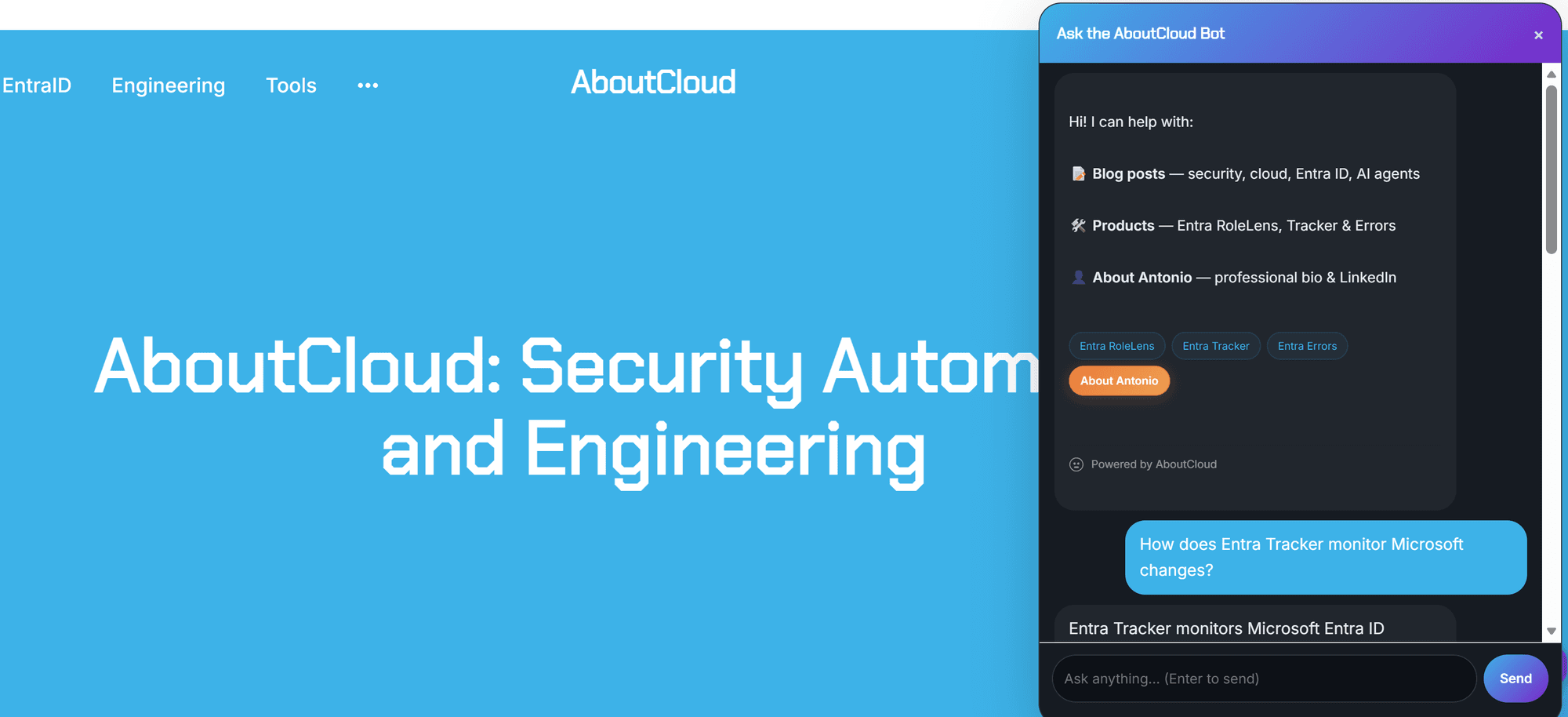
Meet "Ask AboutCloud" . An AI chatbot for the blog and the ENTRA ID Community , with safety receipts
This is nothing new in the Tech world.....but if you've visited the blog in the last few days, you've probably noticed a small chat bubble in the bottom-right corner. That's Ask AboutCloud Bot, a new feature I've been quietly cooking up: a semantic search engine and RAG (Retrieval Augmented Generation) chatbot that can answer questions about every post on this blog, plus the three free Entra ID tools I maintain. As well anything related to ENTRA ID in general and Internet searches . It runs end
By Antonio Russo